 SUNSET:

 1
1Different filters help reveal the chemistry of the universe.
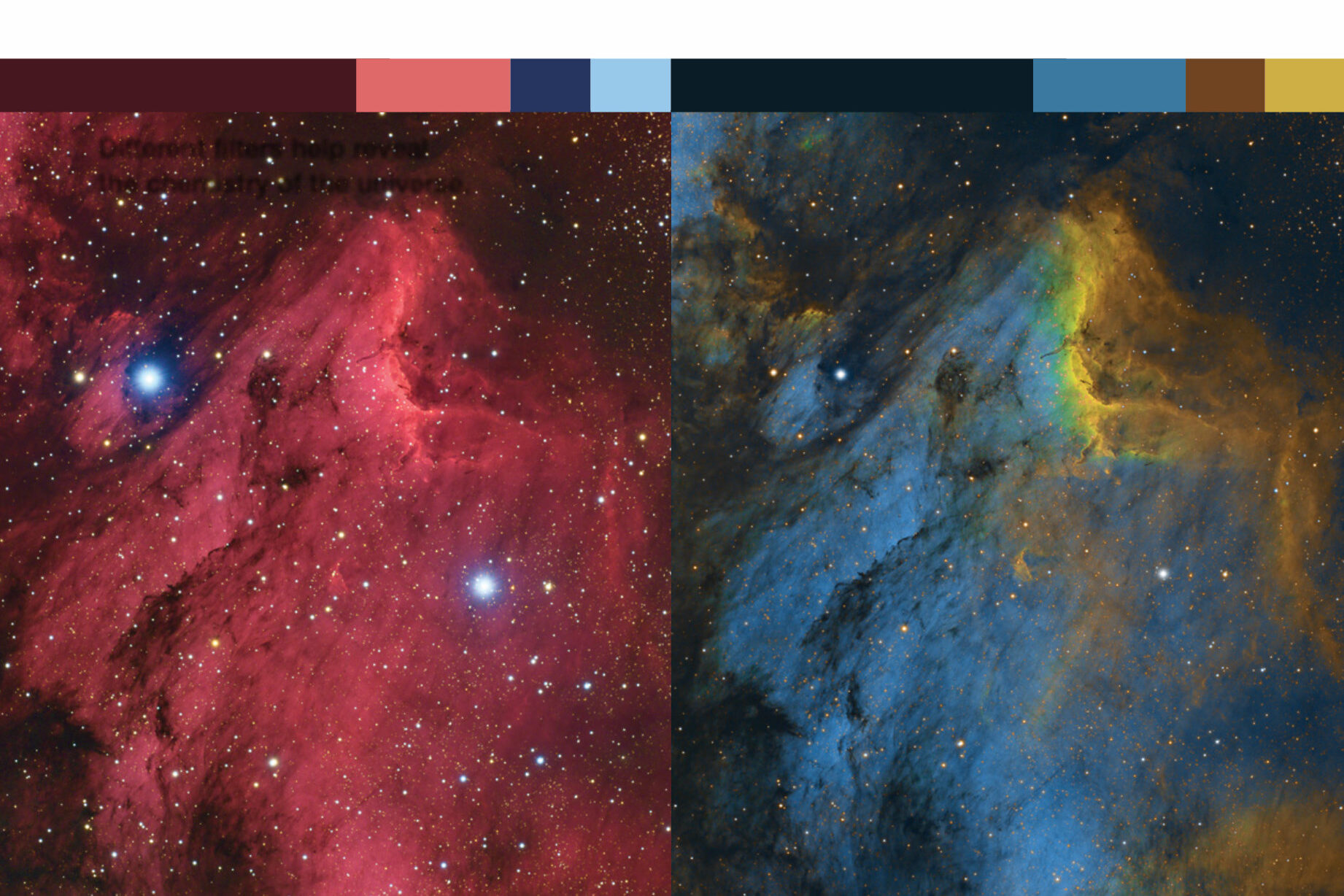
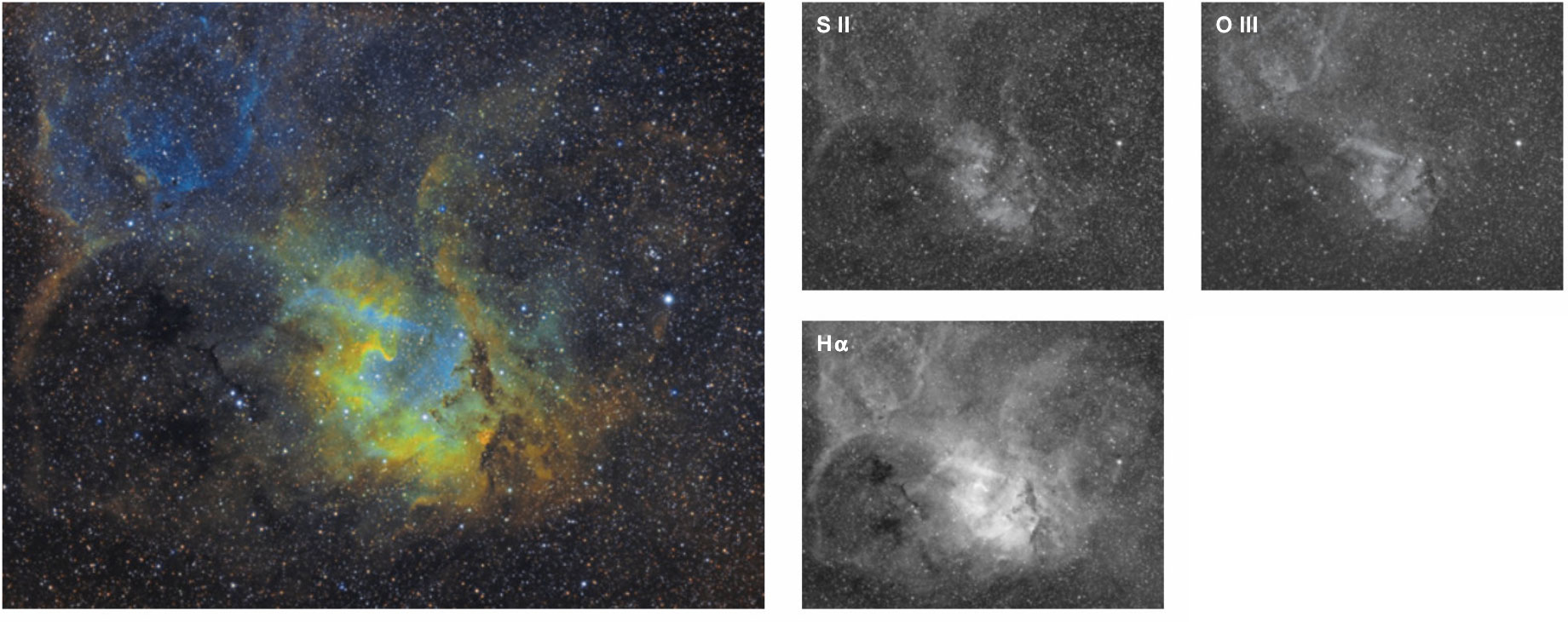
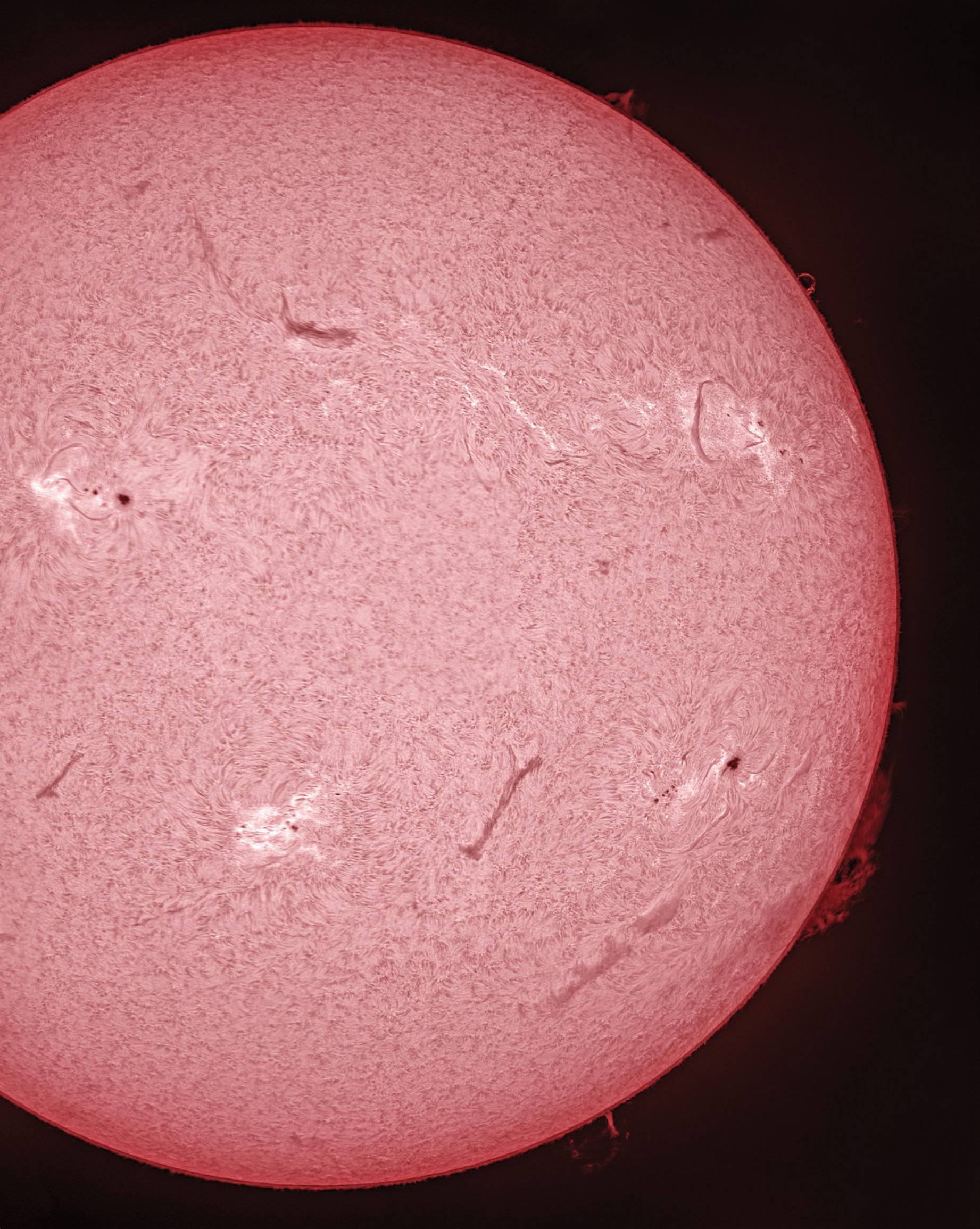
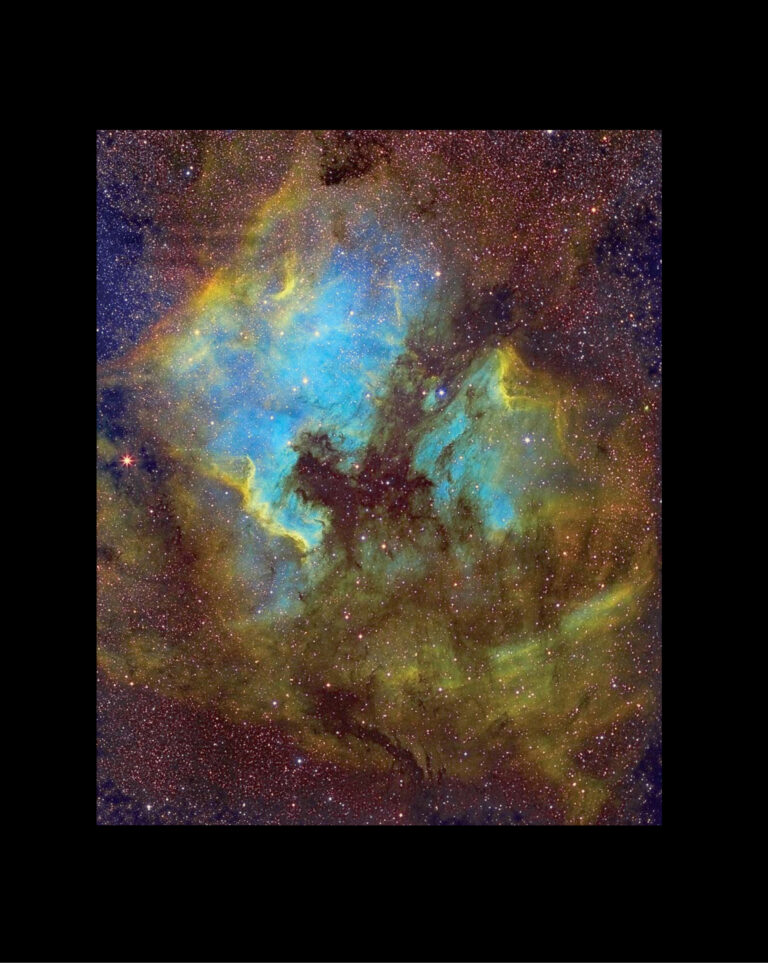
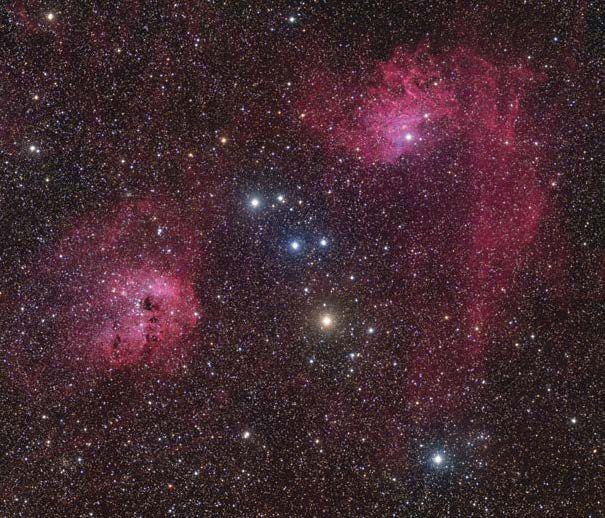
WHAT COLOR IS IT? Images of deep-sky objects can tell us different things depending on how they were acquired. These pictures of emission nebula IC 5070 in Cygnus were shot through both broadband color (above) and narrowband filters (left). The natural-color image shows the region dominated by reddish hydrogen-alpha nebulosity, while the narrowband image highlights the distribution of ionized oxygen (O III) and sulfur (S II).
Ron Brecher
Want to know the truth about color in astrophotography? Well, it isn’t black and white, that’s for sure. The fact is, color is subjective. We all perceive color slightly differently — images evoke different perceptions depending on the viewer, because seeing a photo involves the entire eye-to-brain visual system. A quick glance at the various color choices applied to photos of any particular deep-sky object makes it clear that there is no single “correct” way to present color. Some imagers prefer bold, saturated colors, while others opt for a more muted palette.
Beauty is literally in the eye of the beholder. For those of us who image the night sky, the first and most important judge of every image is its creator. And while there’s plenty of room for flexibility, your color choices shouldn’t be random. Variations in hue and saturation throughout an image can provide important clues to the chemistry and physical structure of your subject. Those choices require a few guiding principles.
Color from Black and White
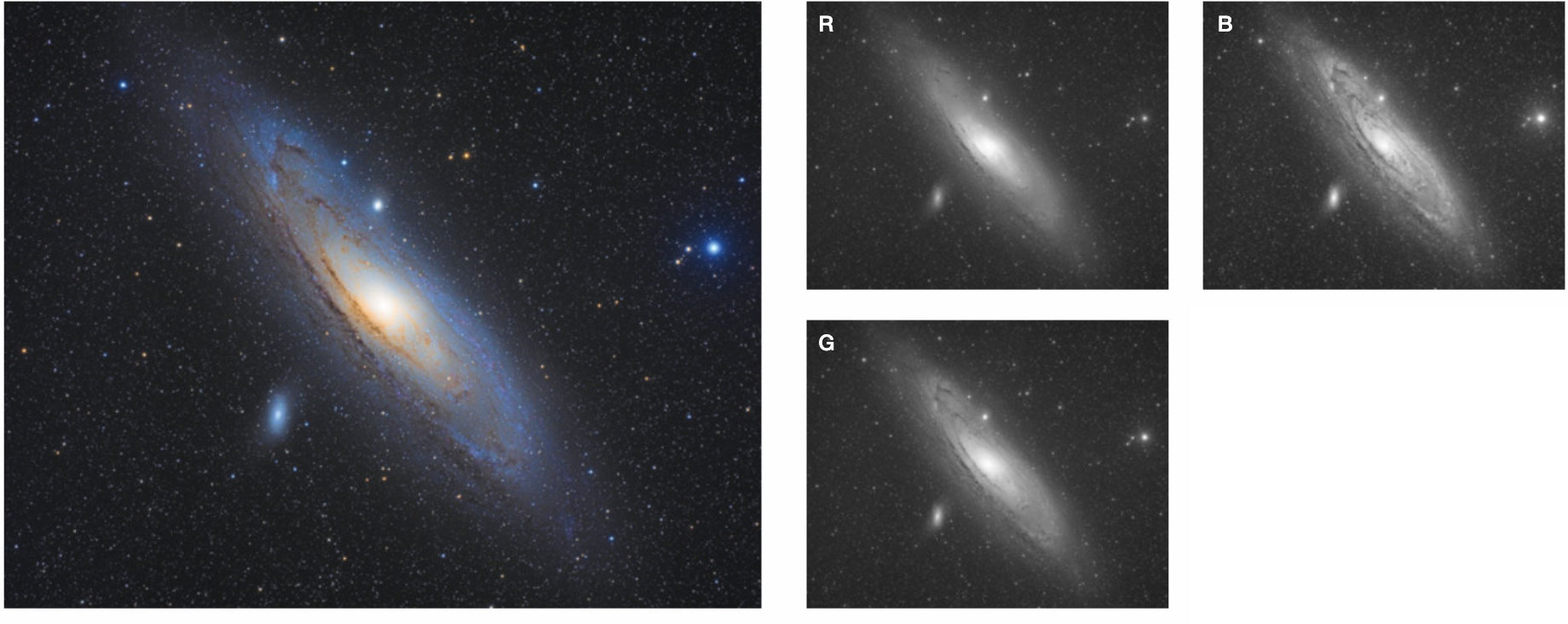
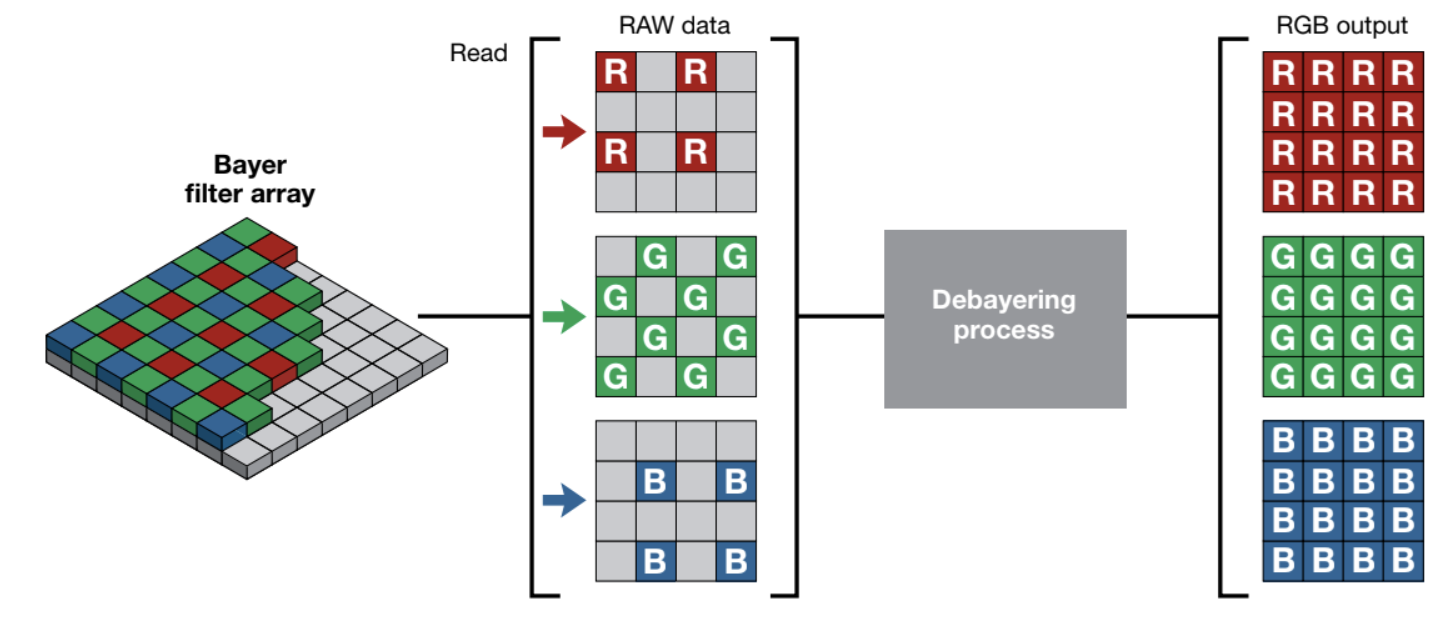
In today’s era of digital photography, virtually every sensor in every digital camera is monochrome, meaning it produces images rendered in shades of gray, ranging from pure black to pure white. These grayscale images contain no color. This is true even for the raw images from consumer digital cameras, including the one in your cell phone. Since these detectors are sensitive to visible light (and more), they require a method to isolate specific wavelengths from different parts of the spectrum — for example, red, green, and blue — that are then combined to make a color picture.
The detectors in your cell phones, DSLRs, and other color cameras contain a built-in array of microscopic red, green, or blue color filters over the pixels. These filters are arranged in a repeating pattern of R, G, and B filters like a checker-board, dividing up the detector into the three primary colors (though some include a fourth, clear filter). The grayscale images from these cameras are then decoded to produce a color image. This array is referred to as a Bayer filter array after its inventor, Bryce Bayer, and the process of reinterpreting the image into color is known as debayering. Debayering is performed automatically in most consumer cameras. Astronomical image-processing software can also debayer DSLR and other color-camera images as long as they were originally recorded in RAW format. (Cameras automatically debayer images saved as JPEG or other formats.) Using RAW allows more processing options when determining color balance in deep-sky images, among other advantages.
Ron Brecher
Cameras with monochrome sensors that don’t include a Bayer array achieve color separation with a filter wheel that allows you to swap multiple filters into the light path one at a time to record each color individually. These sets of images are then assigned to the red, green, and blue channels in software to make a tri-color image. In the most straightforward example, a natural-color picture is produced by assigning light recorded through red, green, and blue filters to the respective channels in your favorite image-processing program.
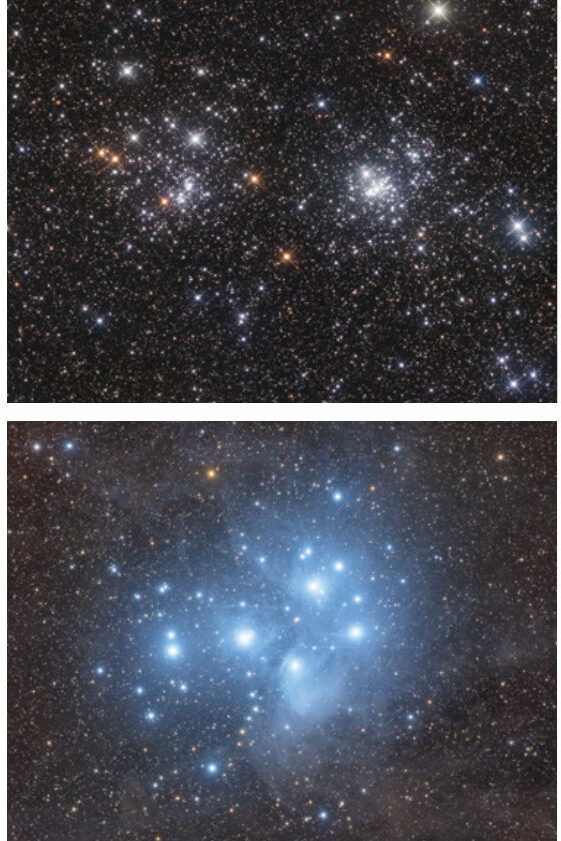
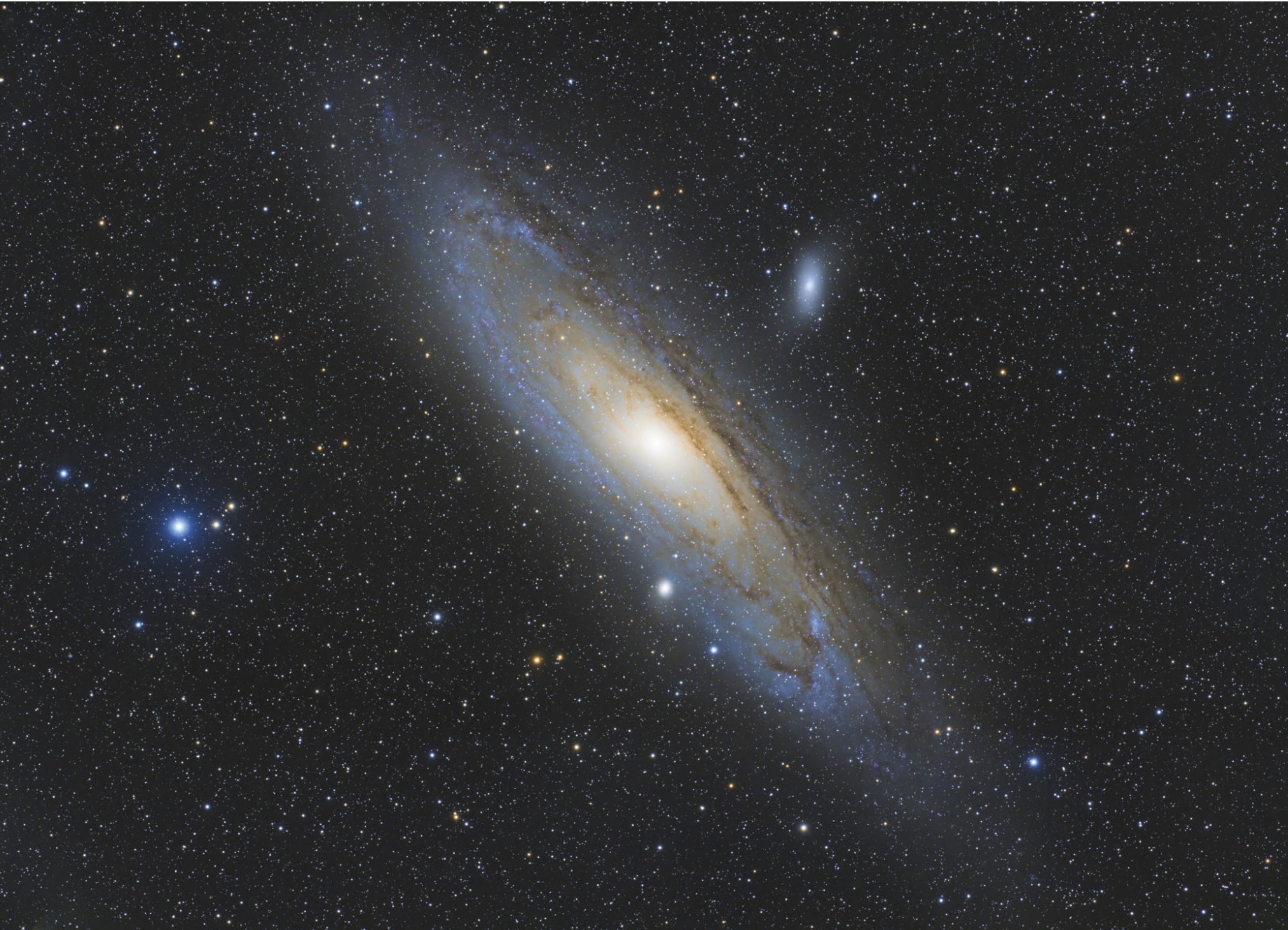
With deep-sky targets, we can’t verify color accuracy with our own eyes, not even through a telescope. But we can aim for a neutral background and a range of star colors that are as unbiased as possible. Some imagers use careful measurements of the recorded data and make color corrections based on a Sun-like field star in order to achieve accurate color. But in general, if you take care to follow one of those two guiding principles, the colors of deep-sky objects should appear as expected based on their physical characteristics. For example, many nearby spiral galaxies sport yellow cores, pinkish patches of emission nebulosity, blue star clusters, and brownish dust lanes. Reflection nebulae display mainly blue nebulosity encrusted with colorful stars. And bright star clusters often appear sprinkled with blue, yellow, and orangish stars.
Specialized Filters
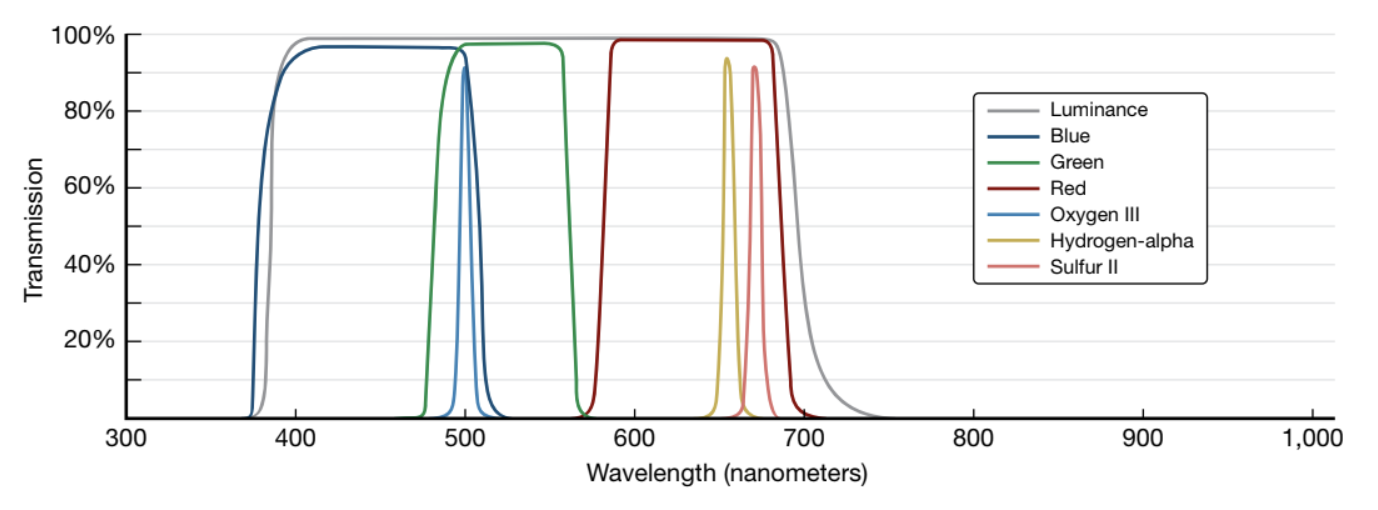
As noted earlier, camera sensors detect a much greater swath of the electromagnetic spectrum than our eyes do — from about 350 to 1,100 nanometers, compared to the human vision range of 380 to 800 nm. Filters block some wavelengths while letting others pass through to the sensor. Most filters used for deep-sky astrophotography block ultraviolet and near-infrared wavelengths, though both extremes are useful for planetary imaging. Earth’s atmosphere blocks the majority of ultraviolet wavelengths. It’s also desirable to block near-infrared light, since it adds a red color cast in images and, in some optical systems, focuses at a slightly different position than visible light, resulting in puffy, bloated stars.
Gregg Dinderman / S&T
Broadband color and narrowband filters are the main ones used for deep-sky astrophotography, and each comes in a few different flavors. Color filters let through light over a wide range of wavelengths. R, G, and B filters pass a range of about 100 nm each, covering the majority of the visible spectrum from about 400 nm to 700 nm. Because of this, color filters, including those in a Bayer filter array, yield the most natural-looking colors. Broadband filters are excellent for imaging any type of deep-sky target, including galaxies, star clusters, and nebulae.
Some broadband filters also block certain wavelengths associated with common light-pollution sources, like mercury and sodium-vapor streetlights, which once dominated city lighting but are being replaced by LED lighting. These light pollution suppression filters are useful under moderately light-polluted skies, though the resulting images may have a slight color cast due to the filter blocking some wavelengths.
Narrowband filters block all light except for specific wavelengths. For example, a hydrogen-alpha (Hα) filter blocks all wavelengths except for a narrow range centered at 656.28 nm, where ionized hydrogen atoms emit light. Hydrogen is the most common element in the universe and is the primary material from which stars are formed. These star-forming regions appear as pinkish clouds of nebulosity riddling the Milky Way and other galaxies. Similar narrowband filters are used to record the emissions from different ionized gases — oxygen (O III), sulfur (S II), and nitrogen (N II). These four are the most abundant gases in the universe that originate from the death of stars in planetary nebulae and supernovae, seeding future star formation. Because narrowband filters only pass a tiny sliver of the visible spectrum, they also block most sources of light pollution and can even attenuate moonlight. This makes them especially useful for imaging in urban conditions, where a broadband approach would be very challenging. Narrowband imaging is best suited to photographing expansive fields of nebulae within the Milky Way.
Ron Brecher
Narrowband filters are most effective when paired with a monochrome sensor, but users with color cameras can still get involved in narrowband imaging. Several manufacturers, including OPT Telescopes (optcorp.com), Optolong Filters (optolong.com), and others sell multi-bandpass narrowband filters. These block most incoming light except those associated with Hα, O III, and sometimes S II. Using these types of filters, most of the hydrogen signal will be captured in the red channel of your color-camera image, while the oxygen signal appears roughly equally on the green and blue pixels.
Leah Tiscione / S&T
Assigning Color Channels
So how do we make a color picture from data recorded through individual filters? You can produce natural-color images with broadband RGB filters and by assigning each color to its respective channel.
A greater range of color choices is available when narrowband filters are either included with RGB filters during acquisition or employed exclusively. Some amateurs mix in narrowband data with broadband images to produce “enhanced color” results — these pictures blend narrowband data with the color channels of the corresponding wavelength in the visible spectrum. For example, Hα is mixed with the red channel of an RGB image to emphasize emission nebulosity. Likewise, O III is added to both the blue and green channels of a natural-color image to enhance the elements’ contributions, which is particularly helpful when targeting planetary nebulae and supernova remnants. This technique retains a natural color balance while enhancing the visibility of dim nebulae.
Ron Brecher
Imaging exclusively with narrowband filters offers the widest range of options when creating a color image. A natural- looking color palette can’t be generated from narrowband data alone because the filters only pass a tiny fraction of the visible spectrum. This affects star colors in particular. Additionally, the three primary narrowband wavelengths don’t fall neatly into corresponding regions of the visible spectrum to make a natural-color image. Doubly ionized oxygen (O III) emits light at two wavelengths near the crossover between blue and green light (500.7 and 495.9 nm), while Hα, N II, and S II appear in the red part of the spectrum within a span of about 15 nanometers at 656.28, 658.4, and 671.6 nm, respectively. For these reasons, photos made solely from narrowband data are referred to as “false-color” images.
Professional astronomers working with the Hubble Space Telescope and other observatories established the narrowband palettes we typically use today. The most common narrowband color combination is referred to as the Hubble Palette since it was popularized in many of the Space Telescope’s most iconic images beginning in the early 1990’s. Hubble astronomers use a descending-wavelength palette by assigning S II, Hα, and O III to the red, green, and blue channels, respectively. At about the same time, astronomers using the Canada-France-Hawaii Telescope (CFHT) chose to combine narrowband data by assigning Hα to the red channel, O III to green, and S II to blue. Each of these approaches presents a very different look.
Another popular narrowband technique is to shoot through only Hα and O III filters, and combine the results by treating Hα as red and assigning O III to both green and blue. This is particularly useful when the target object contains little or no S II component.
Still other astrophotographers aim to get the best of both worlds by shooting their targets with both narrowband and broadband filters. This allows the nebulae to be processed one way, while achieving natural hues in the field stars.
You don’t need to limit yourself to a single result either. I often make multiple versions of an image with the same narrowband dataset.
Processing Tips
We perceive most of the detail in the lightness component (brightness, contrast, graininess, smoothness) of a color image, while the chrominance component provides color information. I try to account for this fact when I process my color pictures by separating the workflow into steps that affect lightness separately from those that focus on color. With this foundation, I use a different approach for broadband images compared to narrowband, regardless of the type of camera used.
When I process natural-color astrophotos, my approach is to complete almost all color corrections before applying any non-linear stretching or detail enhancement. I aim to achieve a neutral background and stars that display natural-looking hues (red, gold, blue, and white). One important step toward achieving this result is to remove any uneven field illumination (such as vignetting and light-pollution gradients) after combining the images into a color composite.
For narrowband images, I also remove gradients fairly early in the workflow. However, I defer all other color adjustments until I’ve fully processed the lightness component of the image, including optimizing the sharpness, smoothness, brightness, and contrast. After that, I adjust the color by aiming for a pleasing combination of tones that reveal the chemistry and structure of my subject.
Narrowband is also a bit different than broadband imaging in that it’s dominated by Hα signal. If we simply combined narrowband channels based solely on the signal recorded in three exposures of the same length, the result would be primarily tinted the color that Hα is assigned. For example, a Hubble palette image would look mostly green. In order to compensate for this imbalance and achieve a wide range of colors in a narrowband image, the three component images need to be stretched so that each color channel contributes fairly equally to the final result.
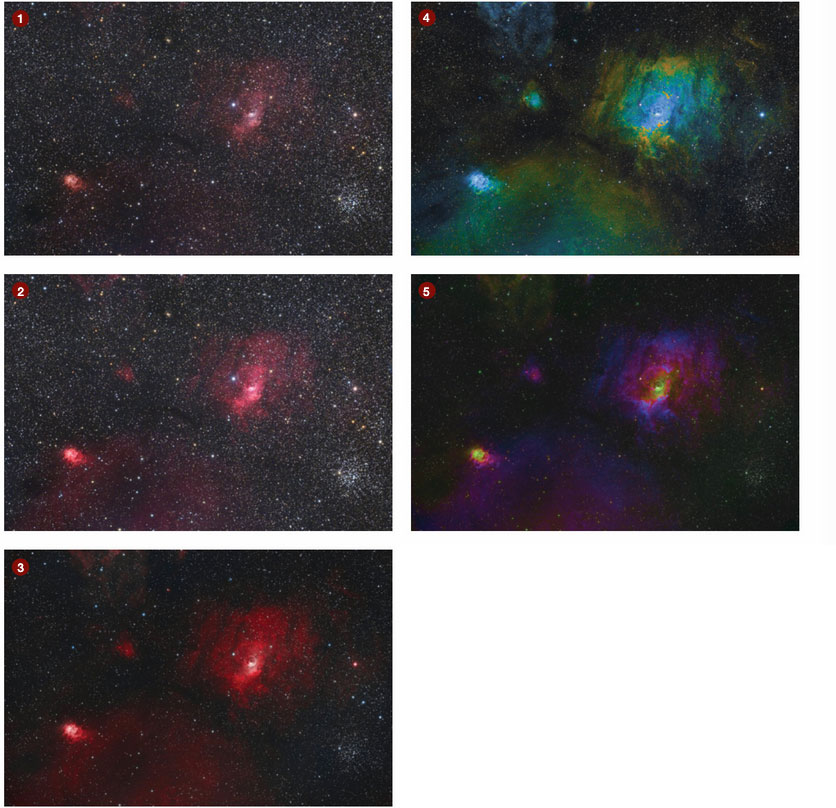
MULTIPLE CHOICE You can combine images of nebulae using broadband color and narrowband filters in several ways. This colorful series shows NGC 7635, the Bubble Nebula, in Cassiopeia through various f ilter combinations. 1 Broadband RGB. 2 Enhanced color by adding Hα to the RGB image. 3 Bi-color image using Hα as the red channel and O III as both the green and blue channels. 4 Narrowband image combined in the Hubble palette (red is S II, green is Hα, and blue represents O III). 5 Narrowband image combined in the CFHT palette (Hα is assigned to the red channel, O III to green, and blue represents the S II component).
Contributing Editor RON BRECHER is always excited to photograph the night sky from his backyard observatory in Guelph, Ontario.
While you process your images, remember that while perception is subjective, measurement is not. It’s important to use your eyes and objective measurements of pixel values to help achieve the result you desire. Your eyes, your screen, and even the ambient light conditions will influence what you see, but do not alter the image data. I often rely on the histogram displays of my images to evaluate whether or not the background is neutral and which colors dominate the midtones.
When it comes to achieving satisfying color images, the same principles apply regardless of which type of camera or filter set you use. Just remember to think about color at each stage of the imaging process, from acquisition to the final presentation of your work.
This article originally appeared in the June 2022 issue of Sky & Telescope.
About Ron Brecher
Contributing Editor RON BRECHER often hosts PixInsight image-processing workshops. Visit his website at astrodoc.ca.


Comments
Daniel Crowe
March 21, 2026 at 4:00 pm
Hydrogen alpha is emitted by excited hydrogen atoms, not ionized hydrogen atoms.
You must be logged in to post a comment.
You must be logged in to post a comment.